Health
Track your weight, steps, heart rate, and sleep right on your dashboard. Syncs automatically from Apple Health each morning — no third-party apps or subscriptions required.
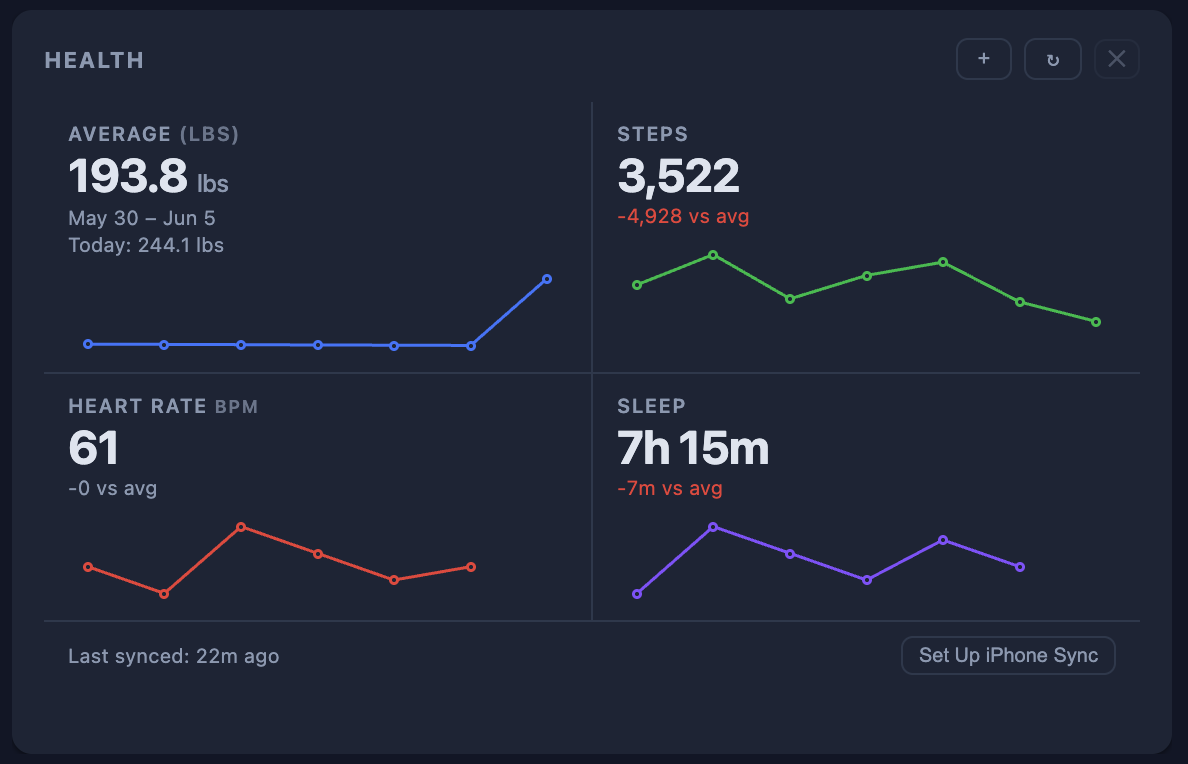
How the Apple Health sync works: Apple HealthKit is a native iOS framework with no public web API. The sync uses the built-in Shortcuts app on your iPhone — a free, one-time 5-minute setup creates a daily automation that reads your Health data and sends it to your dashboard automatically. No app install needed.
What's included
- Four metrics: weight, steps, heart rate, sleep
- Today's value with delta vs 7-day average
- 7-day sparkline bar chart per metric
- Automatic Apple Health sync via iPhone Shortcuts
- Manual entry for any day as a fallback
- Weight shown in lbs or kg (tap to toggle)
- Last-synced timestamp in the widget footer
- Test connection button to verify your setup
- Data stored securely in your private Firestore
How to set up iPhone sync
1
Add the widget
Add the Health widget to your Pro Plus dashboard. A unique webhook URL is generated just for you.
2
Create the Shortcut
Tap "Set Up iPhone Sync" inside the widget. Follow the step-by-step instructions to create a daily Shortcut automation on your iPhone.
3
Test the connection
Use the "Test Connection" button to confirm your Shortcut is wired up correctly before the first automatic run.
4
Auto-syncs every morning
The Shortcut runs at 8 AM daily, reads your Apple Health data, and updates your dashboard automatically.
Your health data, right next to your stocks and weather
Available on Pro Plus. One widget per dashboard, full data privacy — your numbers never leave your account.