Share your dashboard with anyone
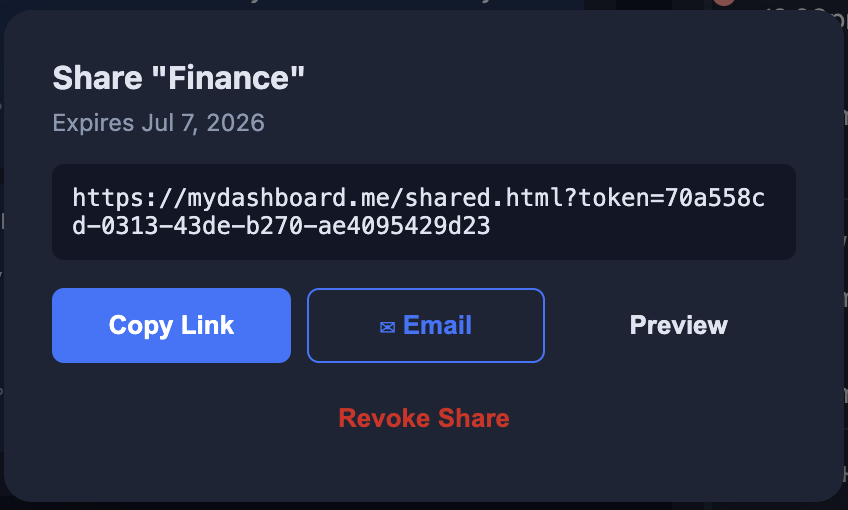
One click generates a live link to your dashboard. Send it to a colleague, a friend, or anyone — they see your widgets in real time, no account required.
What you get
- Generate a shareable link in one click from the sidebar
- Links stay active for 30 days
- Recipients see live widget data — stocks, weather, scores, everything
- Existing MyDashboard users can add a copy directly to their account
- New visitors get a read-only preview, then can sign up to keep their own copy
- Your original dashboard is never changed by anyone you share it with
How it works
Click the share icon
Tap the 🔗 icon next to any dashboard name in your sidebar. A share link is generated instantly.
Send it to anyone
Copy the link and share it however you like — text, email, Slack, wherever. No login required to view.
They view it live
Recipients see your dashboard with real-time data. Existing users can add a copy; new visitors can sign up to keep it.
What recipients see
Existing users
They see your dashboard live and can add it to their own account with one click — subject to their plan's dashboard limit. Their copy is independent; changes don't affect yours.
New visitors
They get a full read-only preview of your dashboard. When they sign up or log in, your dashboard becomes their first — ready to customize from day one.
Expired links
Share links are valid for 30 days. After that, recipients see a clear message. You can always generate a fresh link from the sidebar — your dashboard is unchanged.
Start sharing your dashboard
Dashboard sharing is available on Pro and Pro Plus plans. Start with a free 7-day trial — no credit card required.
Get Started Free